
Showing posts with label huawei. Show all posts
Showing posts with label huawei. Show all posts
Monday, April 8, 2013
Huawei Ascend D2 officially unveiled
Huawei have released the Ascend D2, the latest addition to their smartphone range and it features a 5-inch Super Retina display.
The Ascend D2, revealed at CES 2013, runs Android 4.1 Jellybean and features a 13MP BSI camera with an ISO sensitivity higher than other smartphones on the market.
Powered by a 3000mAh battery, Huawei says the Ascend D2 has a standby time of six days on WCDMA. Utilising Huawei’s QPC technology, battery consumption is kept to a minimum by automatically turning off the transmitter circuit when data transmission is not in use. Huawei claims this technology will reduce power consumption in standby mode by over 20%.
Encased in an aluminium body with a metal frame and weighing 170g, the large-screen smartphone comes in two colours; pure white and crystal blue. The D2 features ‘swift sharing’ software, allowing users to share pictures, videos and other files to be shared over a Wi-Fi connection two or three times faster than other smart phones.
Manufacturer Huawei has also promised a 4.7-inch screen version.
The Huawei Ascend D2 is planned for release in China at the end of January 2013, and in Japan in the future, however a UK release date wasn’t mentioned at the event.
via: T3

Tuesday, March 12, 2013
HUAWEI MMC297u User Manual Guide
HUAWEI MMC297u User Manual Guide - Due to limited space here in the web pages, information including but not limited to products specification and functional descriptions may be incomplete. For detail products information, please refer to products Users Manual. All features, functionality and other product specifications are subject to change without notice or obligation.
The availability of particular products, services and features may vary by region. These specifications and products appearance are subject to change without prior notice.
 |
| Huawei Image |
Huaweis product names are either trademarks or registered trademarks of Huawei. Huawei reserves the copy right to all products, company name and information not marked herein with TM ( Trademark ) and ®.
Operation times and performance of battery may vary depending on operator network configuration, signal strength and usage.
Thanks to its sleek design and brilliant high-resolution display, the MMC297u Digital Photo Frame is sure to stand out as an ornament for your desk. Apart from basic functions of a photo frame, it pro-vides multiple value-added functions. For example, it can be used as a calendar. You can send multimedia messages (with snapshots and text added) from your mobile phone to the photo frame, sharing with others your joyful moments. You can also copy photos from a connected memory device to the photo frame.
Download Here HUAWEI MMC297u User Manual Guide
How to reset Huawei Activa 4G
 When you are going to handover your phone to other person, you need to clear your saved personal data. Or when you are going to sell your used phone, you need to remove all data and your personal phone setting. This is called resetting phone. Sometimes resetting is needed when some difficulties occur with the phone such phone became very slow,or freeze, or phone shows abnormal behavior. Some times resetting can save your money by prohibiting you from purchasing a new phone.
There are two types of resetting and one is soft reset and another is hard reset. Soft reset can change your personal phone setting but hard reset can erase all data such all personal data and installed application. Hard reset can bring phone to its original state. Resetting can be called as many ways, Here I’ll show you how to reset Huawei Activa 4G . And some one ask as following ways: How to restore Huawei Activa 4G . How to factory reset Huawei Activa 4G . How to factory restore Huawei Activa 4G . How to format Huawei Activa 4G . How to master reset Huawei Activa 4G . How to soft reset Huawei Activa 4G . How to full reset Huawei Activa 4G . How to full restore Huawei Activa 4G . How to full erase Huawei Activa 4G . All Data Will Be Lost ! Back Up Your Data Before Doing Hard Reset.
If youve neglected your password, then hard reset it back again to
default manufacturing unit options. This will wipe clean your cellphone,
so again it up. Pattern lock monitor my Android Metropcs & Cricket cell telephone.
Cellphone restore video tutorial unroot
Hard Hard Reset Huawei Activa 4G Video tutorial
** Do not hard reset if you really need it.
** Sometimes hard reset may damage your device permanently.
** Do not forget to back up your useful date before hard reset your Huawei Activa 4G because hard reset will erase all data from your phone including installed applications.
Saturday, March 9, 2013
Huawei Ascend P1 User Manual Guide
Huawei Ascend P1 User Manual Guide - With a 4.3-inch Super AMOLED screen resolution of 960x540 pixels, the Ascend P1 has exactly the same dimensions of the screen with the Motorola RAZR. The disadvantage is the same, still uses PenTile Matrix where one pixel contains only two subpixels, so it will look less sharp than the usual type that contains three RGB subpixels, but large enough pixel density (256ppi) this does not interfere when compared PenTile Matrix screen Super AMOLED Galaxy S Advance (217ppi), though of course still not as sharp as the Galaxy Nexus / Note with its 720p HD display. To be sure in normal use PenTile Matrix at Ascend P1 relatively unobtrusive unless properly addressed at close range. Characteristics of the Super AMOLED screen that produces a pleasing display with high contrast and black really black really spoil your eyes, even though many are called if AMOLED is not natural and bluish colors than LCD due to a very ngejreng. The angle of vision and performance in the sun too good.
 |
| Huawei Image |
By carrying out the main unibody design with a thickness of 7.7 inches and white ceramic alloy body color on the back, and a glossy black color on the face to make and shape Ascend P1 looks so interesting.
In addition, micro SD slot and a SIM card can also be accessed directly on the side of the body. Other features such as tombolvolume sound, camera shortcut, and the power / lock are also pinned on this smartphone.
Camera and video recording
Ascend P1 brings the power of an 8 megapixel rear camera, then A list of features is also pinned on the Ascend P1 camera including HDR, Burst Shot, Smile Shoot, Effect that can give you satisfaction in capturing important moments.
Meanwhile, the quality of the video recording smartphone made by Huaweis nice to say, you can record the moment with up to 1080p HD video quality. But unfortunately when you do not use extra memory, Ascend P1 restricts you to record certain moments such as concerts that require storage space.
Download Here Huawei Ascend P1 User Manual Guide
Friday, March 8, 2013
How to reset Huawei U120

There are two types of resetting and one is soft reset and another is hard reset. Soft reset can change your personal phone setting but hard reset can erase all data such all personal data and installed application. Hard reset can bring phone to its original state. Resetting can be called as many ways, Here I’ll show you how to reset Huawei U120 . And some one ask as following ways: How to restore Huawei U120 . How to factory reset Huawei U120 . How to factory restore Huawei U120 . How to format Huawei U120 . How to master reset Huawei U120 . How to soft reset Huawei U120 . How to full reset Huawei U120 . How to full restore Huawei U120 . How to full erase Huawei U120 . All Data Will Be Lost ! Back Up Your Data Before Doing Hard Reset.
Hard Resetting Huawei U120
After fully charged Huawei U120 battery and take the the sim card
On dialling screen of your Huawei U120 type these code ##258741 then press call button.
After few seconds hard rerest will start.
** Do not hard reset if you really need it.
** Sometimes hard reset may damage your device permanently.
** Do not forget to back up your useful date before hard reset your Huawei U120 because hard reset will erase all data from your phone including installed applications.
Thursday, March 7, 2013
Huawei Ascend D2 User Manual Guide
Huawei Ascend D2 User Manual Guide - Huawei spawn new smartphone namely, Ascend D2. Huaweis smartphone champion officially released at CES 2013. Ascend D2 will be one of the flagship smartphone rivals. Moreover, Ascend D2 has been equipped with high end specifications.
For the screen, Ascend has a size of 5 inches D2 + IPS Full HD resolution (443 ppi density). The screen is coated with Corning Gorilla Glass and it also has a certificate IPX 5/4 which is the ability of waterproof and anti-dust. Bodynya made of aluminum and has a weight of 170g and a thickness of 9.9 mm.
 |
| Huawei Image |
Huawei Ascend D2 has also been embedded processor 1.5 GHz quad-core processor with Android operating system K3V3 Jelly Bean with 13MP resolution camera with f/2.2 aperture. Matter of style, Ascend D2 has style, power and all the performance youd expect from a smartphone Huawei Ascend. Huawei Ascend D2 also has a battery capacity of 3.000mAh. The plan, the Huawei Ascend D2 will go on sale in China this month and the following areas of Japan later.
[Download Here Huawei Ascend D2 User Manual Guide]
Monday, March 4, 2013
How to reset Huawei Ascend G600

There are two types of resetting and one is soft reset and another is hard reset. Soft reset can change your personal phone setting but hard reset can erase all data such all personal data and installed application. Hard reset can bring phone to its original state. Resetting can be called as many ways, Here I’ll show you how to reset Huawei Ascend G600 . And some one ask as following ways: How to restore Huawei Ascend G600 . How to factory reset Huawei Ascend G600 . How to factory restore Huawei Ascend G600 . How to format Huawei Ascend G600 . How to master reset Huawei Ascend G600 . How to soft reset Huawei Ascend G600 . How to full reset Huawei Ascend G600 . How to full restore Huawei Ascend G600 . How to full erase Huawei Ascend G600 . All Data Will Be Lost ! Back Up Your Data Before Doing Hard Reset.
Hard Resetting Huawei Ascend G600
If your phone screen touch responding then open setting from the application
menu. Tap Backup & reset > Factory data reset ,click reset phone and then
Erase everything to hard reset Huawei Ascend G600.
** Do not hard reset if you really need it.
** Sometimes hard reset may damage your device permanently.
** Do not forget to back up your useful date before hard reset your Huawei Ascend G600
because hard reset will erase all data from your phone including installed applications.
Sunday, March 3, 2013
Huawei Ascend D1 quad User Manual Guide
Huawei Ascend D1 quad User Manual Guide - Huawei Ascend D1 Quad is one of the superstars of this year at Mobile World Congress (MWC) held in Barcelona. But unfortunately the development K3V2 chipset with quad-core CPU is not going according to plan.
Huawei Ascend D Quad result delayed many times. But luckily the wait will soon be over.
Huawei finally managed to solve production problems and has announced the Ascend CPU Quad D will go on sale on September 12 later in China.
 |
| Huawei Image |
In his home country, the products will be sold 2.699 RMB (U.S. $ 425). With competition like the quad-core monster Xiaomi 2 which sold 1.999 RMB (U.S. $ 315), Huawei will find it difficult to convince Chinese buyers choose Ascend D Quad. Have not really tested whether Huaweis quad-core 1.5 GHz CPU K3V2 afford.
Unfortunately, the company still has not announced a release date internationally on the flagship Android device. But surely all hope the time is not much different from its appearance in China.
Download Here Huawei Ascend D1 quad User Manual Guide
Huawei Mediapad 7 Lite User Manual Guide
Huawei Mediapad 7 Lite User Manual Guide - Huawei MediaPad 7 Lite uses unibody design with aluminum material that coats the surface. Huawei MediaPad 7 Lite has features such as support for 3G networks and Wi-FI, feature phone, SMS, and MMS.
From the name we can guess Huawei MediaPad 7 Lite comes with a 7-inch touch screen. Huawei MediaPad 7 Lite uses the Android OS 4.0 Ice Cream Sandwich and has the ability to play 1080p HD video.
 |
| Huawei Image |
Huawei MediaPad 7 Lite is an Android tablet PC which will soon be released. Seripa with other tablets on board as the Galaxy Tab 2 7.0, Media Tablet Pad 7 Lite is already carrying the latest ICS OS Androdi current population is about 2% of all Android handheld in the world.
Download Here Huawei Mediapad 7 Lite User Manual Guide
Huawei Ascend II M865 User Manual Guide
Huawei Ascend II (M865) User Manual Guide pdf - Huawei Ascend II comes with a size of 105 x 56 x 14 mm weighs 110 grams, sukup thick but not too heavy. Still on the front panel, we see a cross section wide touch screen with a size of 3.5-inch resolution of 320 x 480 pixels. The touch screen is capacitive type Ascend II means we can directly access it with your finger without having to wear stylush aka magic wand
Right at the bottom of the screen, there are 4 pieces of sensitive keys consisting of the search, home, multitasking and a back button. This button will work (read: burn) when the handset is turned on, so that if the phone is switched off if does not have any buttons.
 |
| Google Images |
Armed with a new Operating System, Android v2.3 Gingerbread certainly have an impact on applications and entertainment it brings. Call it an image recording resolution 5 megapixel camera with Geo-tagging and video recording. EVDO Rev network data access. A (class 3G/HSDPA is when in GSM mode) which can be sped up to 3.1 MBps. Sepcepat connection that we can use to download the video as much, of course offset by the quality of the operators network and we certainly pulses.
On the other hand, we can enjoy the music through mp3 player or video player default. If not satisfied, can download similar applications in the Android Market free!!!. Data cable, Bluetooth, connectivity to WiFi classmates were also present to enliven the Ascend II.
Ascend II comes with 256 MB RAM and 512 MB ROM. Too bad I did not find any other information about the internal memory used doiih. But do not be so sad don! Because Huawei was still kind enough to include a microSD external memory slot that can be lauched up to 32GB, mantab!
Meanwhile, to compensate for the existing features, Huawei Acsend II equipped with a battery capacity of 1400 mAh Li-Ion type. Is large enough for the size of the Android smartphone today.
Download Huawei Ascend II (M865) User Manual Guide pdf
Saturday, March 2, 2013
Huawei M835 User Manual Guide
Huawei M835 User Manual Guide Pdf - Huawei M835 is an Android smart phone that is not too much to offer superior features, just cheap only. Some of the features available include a touch screen measuring 2.8 inches with a resolution of QVGA or 320 x 240 pixels, 3.2 MP camera, Bluetooth, WiFi, AWS technology and the Android operating system version 2.2 or Froyo. The weight of this phone is 115 grams.
 |
| Google Images |
Internal storage capacity is minimal, only 256 MB. However you can add external memory by inserting a micro SD compatible up to 32 GB. Power on the phone is powered by a Lithium Ion battery with a capacity of 1200 mAh. Battery standby time is about 210 hours with talk time up to 4 hours.
Download Huawei M835 User Manual Guide Pdf
Huawei Vision User Manual Guide
Huawei Vision User Manual Guide Pdf - Huawei Vision Android Gingerbread price is hp, 5 MP camera, 1GHz processor, 3.7-inch screen. Check the latest price of Huawei Vision.
The era of Android phones that carry the 3D display has started. Previous LG has released the HP Android with 3D display that the LG Optimus 3D. Now, one electronics company from China, Huawei has announced Huawei Vision Android phone that carries a 3D display with a 3.7 inch screen.
 |
| Google Images |
Huawei Vision runs on Android Gingerbread platform supported by the processor speed of 1 GHz Snapdragon processor (Qualcomm Snapdragon MSM 8255 processor) and paired with 512 MB of RAM. The combination is able to present a fairly smooth performance when running multitasking.
Phones that have a thickness of 9.9 mm and a weight of about 121 grams is equipped with a 5 MP camera with auto focus facility and the availability of flash. To obtain information about the image metadata, this phone supports geo-tagging and can also function as a moving image recording HD-quality 720p @ 30fps.
To store a variety of files such as photos, videos and documents this phone has an internal storage capacity of 2GB and up to 32GB memory card inserted.
Download Huawei Vision User Manual Guide pdf
Thursday, February 28, 2013
How to reset Huawei U8860 Honor
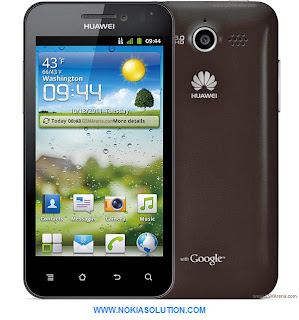
There are two types of resetting and one is soft reset and another is hard reset. Soft reset can change your personal phone setting but hard reset can erase all data such all personal data and installed application. Hard reset can bring phone to its original state. Resetting can be called as many ways, Here I’ll show you how to reset Huawei U8860 Honor . And some one ask as following ways: How to restore Huawei U8860 Honor . How to factory reset Huawei U8860 Honor . How to factory restore Huawei U8860 Honor . How to format Huawei U8860 Honor . How to master reset Huawei U8860 Honor . How to soft reset Huawei U8860 Honor . How to full reset Huawei U8860 Honor . How to full restore Huawei U8860 Honor . How to full erase Huawei U8860 Honor . All Data Will Be Lost ! Back Up Your Data Before Doing Hard Reset.
Hard Resetting Huawei U8860 Honor
1. On the setting screen touch back up & reset ->Factory data reset.
2. When prompt touch reset phone after that touch erase everything.
3. The Huawei u8860 Honor back to its original state and restart.
** Do not hard reset if you really need it.
** Sometimes hard reset may damage your device permanently.
** Do not forget to back up your useful date before hard reset because hard reset will erase all data from your phone including installed applications.
How to hard reset Huawei U8300
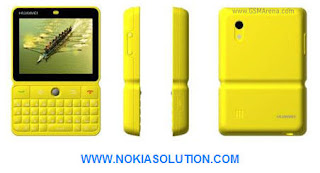
There are two types of resetting and one is soft reset and another is hard reset. Soft reset can change your personal phone setting but hard reset can erase all data such all personal data and installed application. Hard reset can bring phone to its original state. Resetting can be called as many ways, Here I’ll show you how to reset Huawei U8300 . And some one ask as following ways: How to restore Huawei U8300 . How to factory reset Huawei U8300 . How to factory restore Huawei U8300 . How to format Huawei U8300 . How to master reset Huawei U8300 . How to soft reset Huawei U8300 . How to full reset Huawei U8300 . How to full restore Huawei U8300 . How to full erase Huawei U8300 . All Data Will Be Lost ! Back Up Your Data Before Doing Hard Reset.
Hard Resetting Huawei U8300
From the home screen press manu key and touch setting.
Touch the privacy
Touch Factory data reset
Touch reset phone
Touch erase everything
** Do not hard reset if you really need it.
** Sometimes hard reset may damage your device permanently.
** Do not forget to back up your useful date before hard reset your Huawei U8300
because hard reset will erase all data from your phone including installed applications.
Wednesday, February 27, 2013
How to reset Huawei Ascend G300
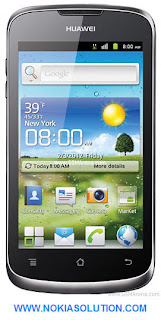
There are two types of resetting and one is soft reset and another is hard reset. Soft reset can change your personal phone setting but hard reset can erase all data such all personal data and installed application. Hard reset can bring phone to its original state. Resetting can be called as many ways, Here I’ll show you how to reset Huawei Ascend G300 . And some one ask as following ways: How to restore Huawei Ascend G300 . How to factory reset Huawei Ascend G300 . How to factory restore Huawei Ascend G300 . How to format Huawei Ascend G300 . How to master reset Huawei Ascend G300 . How to soft reset Huawei Ascend G300 . How to full reset Huawei Ascend G300 . How to full restore Huawei Ascend G300 . How to full erase Huawei Ascend G300 . All Data Will Be Lost ! Back Up Your Data Before Doing Hard Reset.
Hard Resetting Huawei Ascend G300 video
** Do not hard reset if you really need it.
** Sometimes hard reset may damage your device permanently.
** Do not forget to back up your useful date before hard reset your Huawei Ascend G300
because hard reset will erase all data from your phone including installed applications.
Sunday, February 24, 2013
How to reset Huawei U9130 Compass

There are two types of resetting and one is soft reset and another is hard reset. Soft reset can change your personal phone setting but hard reset can erase all data such all personal data and installed application. Hard reset can bring phone to its original state. Resetting can be called as many ways, Here I’ll show you how to reset Huawei U9130 Compass . And some one ask as following ways: How to restore Huawei U9130 Compass . How to factory reset Huawei U9130 Compass . How to factory restore Huawei U9130 Compass . How to format Huawei U9130 Compass . How to master reset Huawei U9130 Compass . How to soft reset Huawei U9130 Compass . How to full reset Huawei U9130 Compass . How to full restore Huawei U9130 Compass . How to full erase Huawei U9130 Compass . All Data Will Be Lost ! Back Up Your Data Before Doing Hard Reset.
Hard Reset Huawei U9130 Compass
After fully charged Huawei U9130 Compass battery and take the the sim card
On dialling screen of your Huawei U9130 Compass type these code ##258741 then press call button.
** Do not hard reset if you really need it.
** Sometimes hard reset may damage your device permanently.
** Do not forget to back up your useful date before hard reset your Huawei U9130 Compass because hard reset will erase all data from your phone including installed applications.
Subscribe to:
Posts (Atom)